
How to Cite a Website: APA and MLA Examples

Written by Elena BrooksLast updated: August 5, 202621 min read

Research smarter with Acade
One Academic Agent for literature search, research design, writing, and more.
Try Start free →Quick Answer: How to Cite a Website
To cite a website, first identify the required citation style. Record the author or organization, webpage title, website name, publication or update date, and stable URL. Arrange those elements in the order required by APA or MLA, create the matching in-text citation, and verify every field against the original page before submitting your work.
Simplified APA webpage template
Author, A. A. (Year, Month Day). Title of webpage. Website Name. URL
Simplified MLA webpage template
Author Last Name, First Name. “Title of Webpage.” Website Name, Publisher if needed, Day Month Year, URL.
Rules change according to the source and the information available. An online journal article, report, news story, dataset, social-media post, or video may require a different format even when you accessed it through a website.
Generate and Check Your Citation with Acade
What Information Do You Need to Cite a Website?
Collect the source details before trying to format the citation. Automatic tools can only work with the metadata they receive, and webpage metadata is often incomplete or misleading.
Field | What to record | Where to look | What to verify |
|---|---|---|---|
Author | Individual author, group author, or responsible organization | Byline, “About,” editorial note, report cover, or page footer | Do not assume the website name is the author. |
Publication date | Date the page was published, substantively updated, or reviewed | Near the title, byline, page footer, metadata panel, or revision history | Do not use a generic site copyright year without checking whether it applies to the page. |
Webpage title | Title of the specific page you used | Main page heading, browser title, or metadata | Prefer the title displayed on the page when browser metadata adds branding text. |
Website name | Name of the larger website or container | Header, logo, footer, or About page | Distinguish the page title from the site title. |
Publisher | Organization responsible for publication when the style and source require it | Footer, About page, legal notice, or institutional information | In MLA, omit redundant publisher information when appropriate. |
URL | Stable address for the exact page | Browser address bar, permalink, share link, or DOI record | Remove tracking parameters when doing so does not break the page. |
Access date | The date you consulted the page | Your research log | Include it only when the applicable style, source condition, or instructor requires it. |
Open the page rather than relying only on a search-result snippet. Check the top of the article, the bottom of the page, author profile links, “last updated” labels, and the organization’s About page. When the details remain uncertain, document the uncertainty instead of inventing an author or date.
Are You Citing a Website or a Webpage?
A website is the complete collection of pages under a site or domain. A webpage is one specific page within that site. In most academic work, you cite the specific page that contains the information you quoted, paraphrased, or summarized.
For example:
Cite an entire website only when discussing the website as a whole.
Cite a specific webpage when using content from that page.
Cite an online news article as a news article, not as a generic webpage.
Cite a downloadable institutional report as a report when the report is the source.
Cite a blog post according to the applicable blog-post guidance.
Cite an online journal article as a journal article, ideally using its DOI where the style calls for it.
The MLA Style Center advises creating separate Works Cited entries for individual pages used from the same website, because each page can be accessed directly. (MLA Style Center)
If you are merely mentioning a familiar website as a whole and are not drawing on a specific page, your style guide may allow an in-text mention and URL rather than a formal reference entry. Confirm the rule for the style and assignment you are using.
Choose APA or MLA Before You Format the Citation
Do not choose a style solely because it appears common in your subject. Your instructor, department, university, journal, or publisher determines the required style.
Citation style | Common use cases—not absolute rules | Reference-list name | Typical in-text pattern |
|---|---|---|---|
APA | Social and behavioral sciences, education, psychology, health, and some professional fields | References | Author and year |
MLA | Humanities, literature, languages, cultural studies, and some writing courses | Works Cited | Author or shortened title; page number when the source supplies stable pages |
“APA format” and “MLA format” cover far more than website citations. This guide addresses only webpage references and their corresponding in-text citations. Follow your institution’s full style guidance for paper layout, headings, spacing, title pages, and other source types.
How to Cite a Website in APA
For a typical webpage with an individual author, APA uses the author, full date when available, italicized webpage title, website name, and URL.
APA webpage template
Author, A. A. (Year, Month Day). Title of webpage. Website Name. URL
If the author and website name are the same organization, APA generally omits the repeated website name. A retrieval date is not automatically required for every webpage. It is most relevant when content is designed to change over time and no stable archived version is available. Verify the current rule in the official APA manual or your institution’s guidance.
APA example with an individual author
The following is a hypothetical teaching example. The names, title, website, date, and URL are intentionally fictional.
Source information
Author: Maya Chen
Date: March 12, 2026
Webpage title: Building a Transparent Search Log
Website name: Research Practice Lab
URL:
https://example.org/transparent-search-log
Reference entry
Chen, M. (2026, March 12). Building a transparent search log. Research Practice Lab. https://example.org/transparent-search-log
Parenthetical in-text citation
(Chen, 2026)
Narrative in-text citation
Chen (2026) explains that …
The surname and year in the in-text citation point directly to the beginning of the reference entry.
APA example with an organization as author
This is also a hypothetical teaching example.
Source information
Group author: Center for Open Research Methods
Date: November 8, 2025
Page title: Evaluating Online Research Sources
Website name: Center for Open Research Methods
URL:
https://example.org/evaluating-online-sources
Reference entry
Center for Open Research Methods. (2025, November 8). Evaluating online research sources. https://example.org/evaluating-online-sources
Because the author and website name are identical in this example, the website name is not repeated.
In-text citation
(Center for Open Research Methods, 2025)
APA example with no date
Source information
Author: Research Access Network
Date: No publication or update date found
Page title: Guide to Stable Links
Website name: Research Access Network
URL:
https://example.org/stable-links
Reference entry
Research Access Network. (n.d.). Guide to stable links. https://example.org/stable-links
In-text citation
(Research Access Network, n.d.)
Use n.d. only after checking that the page truly lacks a usable publication or update date.
Common APA website-citation mistakes
Repeating an organization as both author and website name.
Using the site’s copyright year as the page date without evidence.
Applying title case to a webpage title when APA requires sentence case.
Forgetting that the in-text citation normally needs the author and year.
Adding a retrieval date to every static page.
Formatting an online report or journal article as a generic webpage.
Purdue OWL’s current APA overview gives the basic webpage pattern and notes that an unknown-author reference begins with the title. (Purdue OWL) Always reconcile examples with the latest applicable APA guidance and your instructor or publisher’s requirements.
How to Cite a Website in MLA
For a typical webpage, MLA arranges the available core elements: author, title of the page, title of the website as the container, publisher when needed, publication date, and URL. The page title normally appears in quotation marks, while the website name is italicized.
MLA webpage template
Author Last Name, First Name. “Title of Webpage.” Website Name, Publisher if different and relevant, Day Month Year, URL.
Omit elements that do not exist rather than inventing placeholders. MLA’s official guidance says a basic online-work entry includes the author, title of the work, website title as the container, and publication details. (MLA Style Center)
MLA example with an individual author
This is a hypothetical teaching example using the same source information as the APA example.
Works Cited entry
Chen, Maya. “Building a Transparent Search Log.” Research Practice Lab, 12 Mar. 2026, https://example.org/transparent-search-log.
In-text citation
(Chen)
A typical unpaginated webpage does not supply a page number. Do not invent one. If the author’s name already appears in your sentence, a redundant parenthetical author name may be unnecessary.
MLA example with no author
Hypothetical source information
No individual or clearly responsible group author
Page title: Checking a Webpage’s Revision History
Website: Digital Source Skills
Date: 4 February 2026
URL:
https://example.org/revision-history
Works Cited entry
“Checking a Webpage’s Revision History.” Digital Source Skills, 4 Feb. 2026, https://example.org/revision-history.
In-text citation
(“Checking a Webpage’s Revision History”)
Shorten a long title consistently when necessary. The reader must be able to connect the in-text citation to the first element of the Works Cited entry.
MLA example with no date
Works Cited entry
“Guide to Stable Links.” Research Access Network, https://example.org/stable-links. Accessed 5 Aug. 2026.
MLA guidance says to omit a missing publication date rather than inserting n.d. unless an instructor requires otherwise. An access date can be useful when the publication date is missing or content may change. (MLA on missing dates; MLA on access dates)
Common MLA website-citation mistakes
Treating the page title and website title as the same element.
Italicizing the webpage title instead of placing it in quotation marks.
Repeating a publisher that is already represented by the website name when it should be omitted.
Adding
n.d.
when MLA calls for omission of the missing date.
Inventing a page number for an unpaginated webpage.
Using an in-text title that cannot be matched to the Works Cited entry.
APA vs. MLA Website Citations
Element | APA webpage reference | MLA webpage entry |
|---|---|---|
Author format | Surname followed by initials; full organization name for a group author | Surname, first name; organization when responsible |
Date position | Immediately after the author, in parentheses | After container and publisher information |
Missing date | Use n.d. when applicable | Omit the date; consider an access date when useful |
Page title | Sentence case and italicized for a standalone webpage reference | Title case and quotation marks for a page within a website |
Website name | Plain text; omit when the author and site name are identical | Italicized as the container |
Publisher | Usually represented by the website name in a standard webpage reference | Include when relevant; omit redundant information as MLA guidance directs |
URL | Include a working URL | Include the URL according to applicable MLA guidance |
Access date | Used selectively, especially for changeable content | Optional but useful for undated or changeable content; follow instructor requirements |
In-text citation | Author and year; title and year when no author exists | Author, or shortened title when no author exists; add page number only when supplied by the source |
This comparison is limited to ordinary webpages. Different rules can apply to online reports, journal articles, books, datasets, videos, and social-media posts.
How to Cite a Website with No Author
First determine whether the page truly has no author. A government agency, university, nonprofit organization, research institute, or company may be the group author when it is clearly responsible for the content. Do not use an organization merely because its logo appears on the page.
If no individual or group author can be identified:
APA: Move the webpage title into the author position.
Checking a webpage’s revision history. (2026, February 4). Digital Source Skills. https://example.org/revision-history
The matching in-text citation uses a shortened version of the title and the year:
(“Checking a Webpage’s Revision History,” 2026)
MLA: Begin the Works Cited entry with the webpage title.
“Checking a Webpage’s Revision History.” Digital Source Skills, 4 Feb. 2026, https://example.org/revision-history.
The matching in-text citation uses the title or a recognizable shortened form:
(“Checking a Webpage’s Revision History”)
Unclear authorship is also a source-quality issue. If you cannot determine who is responsible for consequential claims, consider whether the page is appropriate evidence for your work.
How to Cite a Website with No Date
Before declaring that a page has no date, check:
The area beside the title and author.
The beginning and end of the article.
“Published,” “Updated,” “Modified,” and “Last reviewed” labels.
A revision-history or page-details panel.
Downloadable report covers or attached files.
Whether the footer date applies to the page or only to the entire site.
“Published” usually identifies the original release. “Updated” may indicate a substantive revision, but sometimes reflects only technical changes. “Last reviewed” can show when content was checked without necessarily showing when it was rewritten. Use the date most relevant to the version you actually consulted, following the applicable style guidance.
In APA, use (n.d.) when no usable date exists. In MLA, omit the missing publication date; do not automatically insert n.d.. An MLA access date may be useful for an undated or changeable page. The MLA Style Center advises using the date most meaningful to the version consulted when several dates appear. (MLA Style Center)
How to Cite an Organization’s Website
Government agencies, universities, nonprofits, medical institutions, research organizations, and companies can be group authors when they are responsible for the page.
Use this process:
Identify the specific unit responsible for the content.
Check whether a named individual author is present.
Distinguish the group author from the website name and publisher.
Remove repetition only when the selected style instructs you to do so.
Match the organizational name in the in-text citation to the reference entry.
For example, a page hosted on a university domain may have a research center as its author and the university as its publisher. A government webpage may be authored by a department, a subagency, or a named expert. Record what the page actually states; do not automatically assign the top-level institution as author.
For abbreviations in APA in-text citations, introduce an abbreviation only when it will be used again and remains clear to readers. The full reference entry should preserve the responsible organization’s full name.
How to Create an In-Text Citation for a Website
An in-text citation must point readers to the corresponding full entry. Build the reference entry first, then use its leading element in the in-text citation.
Situation | APA in text | MLA in text |
|---|---|---|
Individual author | (Chen, 2026) or Chen (2026) | (Chen) |
Organization author | (Center for Open Research Methods, 2025) | (Center for Open Research Methods) |
No author | ("Checking a Webpage’s Revision History," 2026) | ("Checking a Webpage’s Revision History") |
No date | (Research Access Network, n.d.) | (Research Access Network) or the matching title when no author exists |
Direct quotation from an unpaginated page | Author and year plus a suitable locator when required, such as a paragraph or section | Author or title; do not invent page numbers |
For APA narrative citations, place the year after the author: Chen (2026). For a direct quotation from a webpage without pages, consult current APA guidance on locators such as paragraph numbers or section headings.
In MLA, the parenthetical citation should normally begin with the same element that begins the Works Cited entry. If the source has no stable page numbers, do not add a browser print-page count or an invented number.
Website Citation Examples
All entries in this table are hypothetical teaching examples using reserved example.org URLs. They do not represent real publications.
Scenario | Source information | APA reference | MLA Works Cited entry |
|---|---|---|---|
Individual author | Maya Chen; 12 Mar. 2026; “Building a Transparent Search Log”; Research Practice Lab | Chen, M. (2026, March 12). Building a transparent search log . Research Practice Lab. https://example.org/transparent-search-log | Chen, Maya. “Building a Transparent Search Log.” Research Practice Lab , 12 Mar. 2026, https://example.org/transparent-search-log. |
Organization author | Center for Open Research Methods; 8 Nov. 2025; “Evaluating Online Research Sources”; author and site name are identical | Center for Open Research Methods. (2025, November 8). Evaluating online research sources . https://example.org/evaluating-online-sources | Center for Open Research Methods. “Evaluating Online Research Sources.” Center for Open Research Methods , 8 Nov. 2025, https://example.org/evaluating-online-sources. |
No author | 4 Feb. 2026; “Checking a Webpage’s Revision History”; Digital Source Skills | Checking a webpage’s revision history . (2026, February 4). Digital Source Skills. https://example.org/revision-history | “Checking a Webpage’s Revision History.” Digital Source Skills , 4 Feb. 2026, https://example.org/revision-history. |
No date | Research Access Network; “Guide to Stable Links”; no date found | Research Access Network. (n.d.). Guide to stable links . https://example.org/stable-links | “Guide to Stable Links.” Research Access Network , https://example.org/stable-links. Accessed 5 Aug. 2026. |
Government webpage | Office of Community Data; 7 Jan. 2026; “Reading Local Data Tables”; Public Data Portal | Office of Community Data. (2026, January 7). Reading local data tables . Public Data Portal. https://example.org/local-data-tables | Office of Community Data. “Reading Local Data Tables.” Public Data Portal , 7 Jan. 2026, https://example.org/local-data-tables. |
Online report | Research Access Network; 2026; Annual Report on Stable Research Links ; report PDF | Use the applicable APA report format—not the generic webpage template. | Use the applicable MLA report/container structure—not the generic webpage template. |
The final row deliberately does not invent a completed citation. A report requires details such as publisher, report number, and document URL that are not supplied in the hypothetical metadata.
Common Website Citation Mistakes
Mistake | Why it fails | Incorrect example | How to correct it |
|---|---|---|---|
Citing the homepage | Readers cannot locate the specific claim | https://example.org | Cite the exact webpage used. |
Assuming the site is the author | Hosting does not prove authorship | Listing “Research Practice Lab” despite a Maya Chen byline | Use the stated individual author. |
Missing a visible update date | The citation may identify the wrong version | Using n.d. when “Updated 12 March 2026” appears on the page | Confirm which displayed date is relevant under the style. |
Mixing APA and MLA | Element order and formatting no longer follow either style | APA author-year with an MLA quoted page title | Select one required style and apply it consistently. |
Wrong capitalization | APA and MLA title rules differ | Applying MLA title case to an APA webpage title | Apply the selected style’s capitalization rule. |
Wrong italics | Page and container titles have different treatment | Italicizing an MLA page title | In MLA, quote the page title and italicize the website container. |
Unnecessary access date | Adds clutter and may conflict with instructions | Adding retrieval dates to every stable APA webpage | Include an access date only when appropriate. |
Tracking or broken URL | The link may expose campaign data or fail | Copying a URL ending in utm_source=... | Use a stable clean URL that still resolves. |
In-text mismatch | Readers cannot find the full entry | (Research Lab, 2026) when the entry begins Chen, M. | Use the leading author/title and date required by the style. |
Unverified automatic metadata | Extractors may confuse the author, site, or date | Accepting a footer copyright date as the article date | Compare every field with the live source. |
Website Citation Quality Checklist
Copy this checklist before submitting your work:
[ ] I confirmed the required citation style and edition.
[ ] I cited the specific webpage rather than an unrelated homepage.
[ ] I checked for an individual author and a responsible organization.
[ ] I verified the publication, update, or review date.
[ ] I copied the webpage title accurately.
[ ] I distinguished the webpage title from the website name.
[ ] I used the exact element order required by the selected style.
[ ] I applied the correct capitalization.
[ ] I applied quotation marks and italics correctly.
[ ] I used a stable working URL and removed unnecessary tracking parameters.
[ ] I included an access date only when appropriate or required.
[ ] My in-text citation matches the beginning of the full entry.
[ ] Every in-text citation has a corresponding reference or Works Cited entry.
[ ] Every listed entry is actually cited in the paper when the assignment requires it.
[ ] I checked the latest official manual, institutional guide, or publisher instructions.
[ ] I opened the final URL and manually verified all automatically extracted metadata.
Organize Citations for Your Research with Acade
How Acade Helps Complete Citation and References Tasks
Acade is an AI-powered academic research workspace for students, researchers, and medical professionals. Its current website presents literature search, research-library, academic-writing, and citation tools as connected parts of a research workflow. Product availability, supported styles, Credits, and plan limits can change, so check the live product and pricing information before publishing specific plan claims. Product information on this page was checked on August 5, 2026. (Acade)
For a citation task, use a bounded workflow:
Find or import the source.
Start from the exact webpage or research source you used.
Collect the metadata.
Record the author, date, title, site or container, publisher when relevant, and stable URL.
Select the required style.
Use the style and edition required by your instructor, institution, journal, or publisher.
Generate or organize the citation.
Let Acade assist with the reference entry and connected research materials where the current product supports the task.
Compare the result with the source.
Check every field against the live page and the applicable official style guidance.
Match in-text and full citations.
Confirm that every in-text citation points to the correct reference entry.
Continue the research workflow.
Use the verified source in your research library, literature review, outline, or academic draft.
Example task prompt
I need to cite a specific webpage in APA 7. I have provided the exact URL and the metadata visible on the page. Organize the fields, identify anything missing or ambiguous, draft the reference entry and matching in-text citation, and give me a verification checklist. Do not invent an author, date, title, or publisher. Mark any uncertain field for manual review.
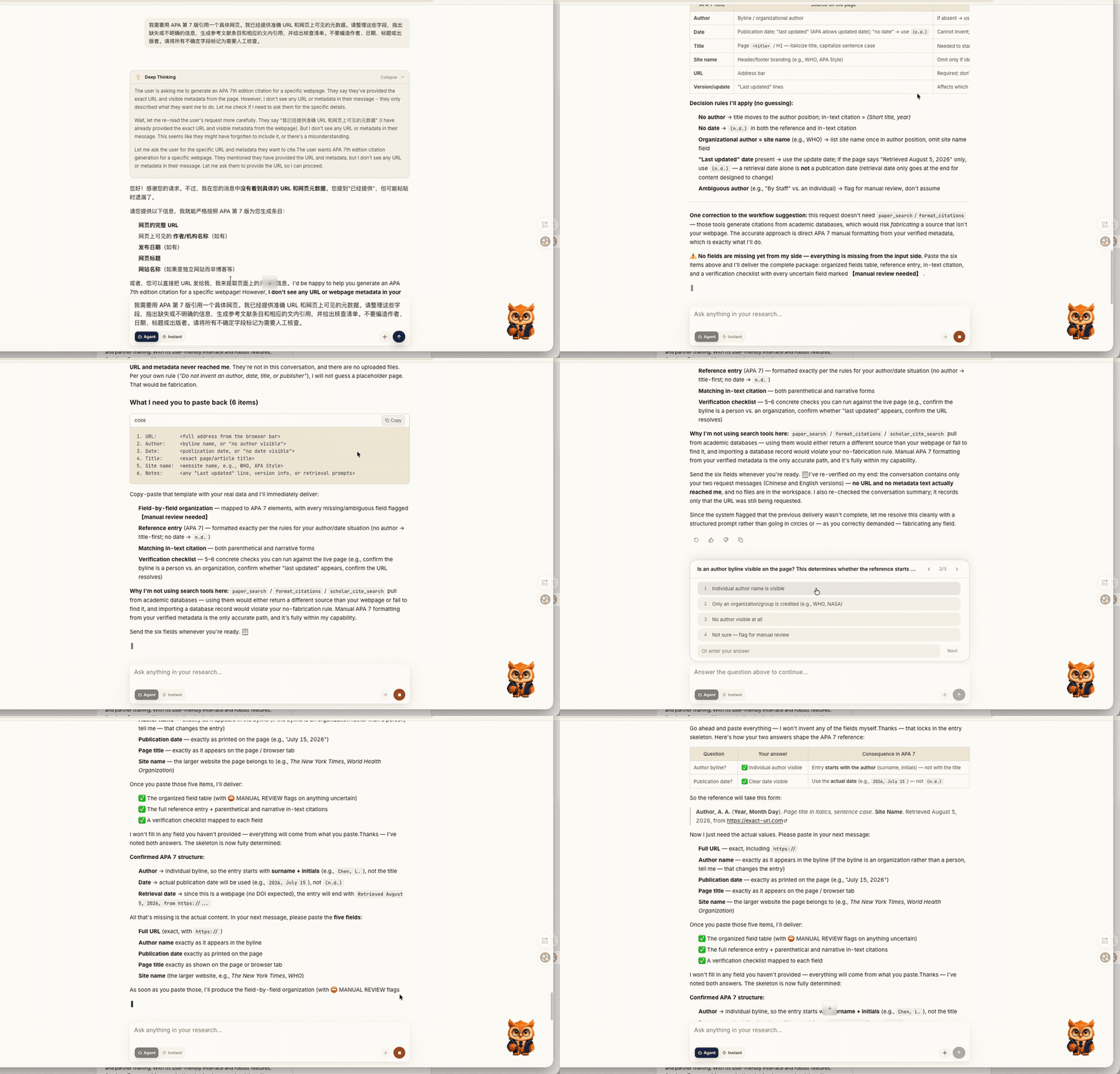
Acade cannot guarantee that automatically extracted metadata or formatted citations are correct. The student or researcher remains responsible for opening the source, checking the applicable style manual, following institutional or publisher requirements, and correcting the final citation.
Frequently Asked Questions
How do I cite a website?
Identify the required style, collect the author, webpage title, website name, publication or update date, and stable URL, then arrange those elements according to the style. Create a matching in-text citation and verify every detail against the original page.
How do I cite a website in APA?
For a typical webpage, use: Author, A. A. (Year, Month Day). Title of webpage. Website Name. URL. The webpage title is italicized in the reference entry. Omit the website name when it is the same as the group author, and use n.d. if no usable date exists.
How do I cite a website in MLA?
For a typical webpage, use: Author Last Name, First Name. “Title of Webpage.” Website Name, Publisher if needed, Day Month Year, URL. Omit unavailable elements and use an access date when useful or required.
How do I cite a website with no author?
First check whether an organization is responsible for the page. If no individual or group author exists, begin the APA or MLA entry with the webpage title. Use the same title, shortened consistently when necessary, in the in-text citation.
How do I cite a website with no date?
Check for publication, update, modified, or review dates before treating the source as undated. APA uses n.d. when no date is available. MLA normally omits the missing date and may include an access date.
Do I need an access date when citing a website?
Not for every webpage. An access or retrieval date is most useful when content changes over time, no publication date exists, or an instructor or publisher requires it. APA and MLA handle access dates differently.
How do I cite an entire website?
If you discuss a website as a whole, some styles allow you to name it in the text and provide the URL without a reference entry. If you use information from a particular page, cite that page instead. Check the applicable style and assignment instructions.
How do I create an in-text citation for a website?
In APA, use the author and year, or a shortened title and year when there is no author. In MLA, use the author or the title that begins the Works Cited entry. Add page numbers only when the source supplies stable pages and the style requires them.
Is a webpage title italicized in APA?
In a standard APA reference for a standalone webpage, the webpage title is italicized and written in sentence case. Do not assume the same treatment applies to every online source type.
Can AI generate website citations accurately?
AI can organize metadata and draft a citation, but it can misidentify authors, dates, titles, publishers, source types, or style rules. Treat the output as a draft and verify it against the live source and current official guidance.
Complete Citation and References with Acade
Tell Acade which webpage you used, the citation style and edition you need, and the source information you can verify. Ask it to organize the citation, flag missing metadata, create the matching in-text citation, and help you carry the verified source into your research library or draft.
About the author
Elena Brooks
Academic Research Content Editor at Acade
Elena Brooks is an Academic Research Content Editor at Acade. She creates practical, evidence-informed content about literature research, research design, academic writing, and the responsible use of AI in scholarly work. She works with Acade’s product team to evaluate research workflows, verify product capabilities, and translate complex academic processes into clear guidance for students and researchers.
Research smarter with Acade
One Academic Agent for literature search, research design, writing, and more.
Try Start free →No credit card required.