
APA Citation: How to Cite Sources, Understand the Rules, and Manage References

Written by Elena BrooksLast updated: August 12, 202616 min read

This guide covers source citation only. For margins, fonts, spacing, title pages, headers, heading levels, tables, figures, and student-versus-professional paper setup, use the APA Format guide.
Research smarter with Acade
One Academic Agent for literature search, research design, writing, and more.
Try Start free →Quick Answer
An APA citation links a statement in your paper to its source through two matching elements: an author–date citation in the text and a full entry in the reference list. Use (Author, Year) for a typical paraphrase, Author (Year) for a narrative citation, and (Author, Year, p. 00) for a direct quotation from a paginated source. The reference format then changes according to whether the source is a journal article, book, webpage, report, dataset, or another work.
To cite a source in APA 7:
Identify the source type and copy its authoritative metadata.
Choose a parenthetical citation, narrative citation, or direct-quotation citation.
Create the matching reference-list entry.
Verify every author, date, title, DOI, URL, locator, and claim against the original source.
Acade can help you generate a working APA citation, understand the rule behind it, and organize references alongside notes and claims. It cannot guarantee that imported metadata is correct or that a source supports your statement. Final verification remains the researcher’s responsibility.
APA Citation at a Glance
If you need to… | Use this form | Working pattern |
|---|---|---|
Paraphrase with the source at the end | Parenthetical citation | (Author, Year) |
Mention the author in your sentence | Narrative citation | Author (Year) |
Quote exact words from a paginated source | Direct-quotation citation | (Author, Year, p. 00) |
Help readers locate the complete source | Reference-list entry | Format varies by source type |
Keep citations consistent across a paper | Verified reference workflow | Source → metadata → citation → claim → audit |
The central rule: a citation is complete only when the in-text citation matches a verified reference entry and the original source actually supports the statement.
Need an APA Citation Right Now?
Start with four pieces of information:
What kind of source is it—a journal article, book, webpage, report, video, or something else?
Who is responsible for the work?
When was it published?
Where can the reader retrieve it—a journal, publisher, DOI, or URL?
Then tell Acade exactly what you need:
Create an APA 7 parenthetical in-text citation, a narrative in-text citation, and a reference-list entry for this source. Do not invent missing fields. Mark every field I need to verify: [paste the DOI, URL, or complete source metadata].
Acade’s official site describes Auto Citation & Referencing as part of its academic workflow. Use that capability to create a working citation and keep it connected to your research task—not as proof that the citation is correct. The APA Style website and the Publication Manual of the American Psychological Association remain the primary authorities for APA rules. Acade’s current product scope is described on its official homepage.
A safe citation workflow:
Identify the source → capture metadata → choose citation type → generate → compare with APA rules → verify against the source → use consistently
Tell Acade what you are citing and generate a citation you can verify →
What Is an APA Citation?
APA Style uses an author–date system. A reader should be able to move from the short citation in your sentence to the matching entry in the reference list. Purdue OWL summarizes the basic rule this way: an in-text citation normally includes the author’s surname and publication year, while every source cited in the text should have a corresponding full reference. Direct quotations generally also need a page number or another locator. See Purdue OWL’s APA in-text citation guide.
That means “APA citation” can refer to several related but different tasks:
Task | What you create | Example purpose |
|---|---|---|
Parenthetical citation | Author and year in parentheses | Place the source at the end of a paraphrased claim |
Narrative citation | Author in the sentence; year in parentheses | Emphasize the researcher or organization |
Direct-quotation citation | Author, year, and locator | Show exactly where quoted wording appears |
Reference-list entry | Full publication and retrieval details | Let readers identify and locate the source |
Reference management | A checked collection of source records | Keep citations consistent across a longer paper |
An online generator may help format these elements. It does not decide whether a source is credible, whether the evidence supports your statement, or whether you have paraphrased appropriately.
The Main Ways to Cite a Source in APA 7
1. Parenthetical in-text citation
Use a parenthetical citation when the source supports the statement but the author’s name does not need to be part of your sentence.
Pattern:
(Author, Year)
Illustrative example:
Students benefit when source-evaluation steps are taught explicitly (Rivera, 2024).
The name and publication details in this example are illustrative; they are not a real source.
2. Narrative in-text citation
Use a narrative citation when the author or organization plays a meaningful role in your sentence.
Pattern:
Author (Year)
Illustrative example:
Rivera (2024) argued that students should evaluate a source before adding it to a paper.
Do not alternate between parenthetical and narrative citations merely for variety. Choose the form that makes the sentence clearer.
3. Citation for a direct quotation
For a direct quotation, include the author, year, and a locator. A paginated source normally uses p. for one page and pp. for a page range. A webpage without page numbers may require a paragraph number, section heading, or another logical locator. Purdue OWL also notes that quotations of 40 words or more use block-quotation formatting.
Pattern:
(Author, Year, p. 00)
Copying exact wording without quotation marks and a citation is not corrected merely by adding the source to the reference list.
4. Citation for a paraphrase
A paraphrase expresses a source’s idea in genuinely new wording and sentence structure. APA in-text citation still requires the author and year. A page or paragraph locator is not always mandatory for a paraphrase, but it can help the reader find a specific passage in a long or complex work.
Replacing a few words with synonyms is not a sufficient paraphrase. Read the passage, set it aside, explain the meaning in your own analytical context, and then compare your version with the original.
5. Secondary citations
A secondary citation refers to an original work that you encountered only through another source. Use it sparingly. Whenever feasible, retrieve and read the original work. If the original cannot be obtained, follow APA’s secondary-source rules and include only the work you actually read in the reference list.
Do not let an AI system summarize or cite an original study as though you had examined it when you have only seen another author’s description.
How to Build an APA Reference
Most APA references can be checked by asking four questions:
Who?
Author, group author, editor, or responsible organization
When?
Publication date, or
n.d.
when APA rules genuinely permit it
What?
Title of the work
Where?
Journal, volume, issue, pages, publisher, DOI, or URL as applicable
The punctuation, capitalization, italics, and order depend on source type. Use the APA reference examples when the source does not fit a familiar pattern.
Journal article
General pattern:
Author, A. A., & Author, B. B. (Year). Title of article. Journal Title, volume(issue), page–page. https://doi.org/...
Verify the author order, year, article title, journal title, volume, issue, page or article number, and DOI. Do not infer a DOI from a search snippet.
Book
General pattern:
Author, A. A. (Year). Title of book. Publisher.
An edition is included when relevant. The format changes for edited books, translated works, and chapters in edited volumes.
Chapter in an edited book
General pattern:
Chapter Author, A. A. (Year). Title of chapter. In E. E. Editor (Ed.), Title of book (pp. xx–xx). Publisher.
The chapter author is not interchangeable with the book editor. This is a frequent metadata error in automatic generators.
Webpage
General pattern:
Author or Organization. (Year, Month Day). Title of page. Site Name. URL
A copyright year in a website footer is not necessarily the page’s publication date. If the author and site name are the same, APA may omit the repeated site name. Retrieval dates are reserved for content designed to change over time, not every ordinary webpage.
Report
General pattern:
Organization or Author. (Year). Title of report (Report No. if applicable). Publisher. URL
Check whether the organization is acting as author, publisher, or both. Do not use a webpage title in place of the report title when a downloadable report has its own title page.
Dataset, software, video, podcast, and social media
These sources have type-specific elements that may include version numbers, medium descriptions, episode details, timestamps, or account names. Avoid forcing them into a journal-article template. Select the matching example from the official APA guide.
A Step-by-Step APA Citation Workflow
Step 1: Start from the source, not a search result
Open the publisher page, database record, book title page, report, or authoritative webpage. A search-engine snippet can be truncated or outdated.
Completion check: You can identify the actual work and its responsible author or organization.
Step 2: Capture the original metadata
Record the fields exactly as shown by the source. For a journal article, copy the author order, publication year, article title, journal, volume, issue, pages or article number, and DOI.
Common error: Copying metadata from another paper’s bibliography without checking the original record.
Step 3: Decide what you are doing with the source
Are you paraphrasing, quoting, summarizing an entire work, or referring to a specific table or result? This determines the in-text citation and whether a locator is needed.
Completion check: Every borrowed claim has an appropriate citation at the point where it is used.
Step 4: Generate the working citation
Enter the verified metadata into Acade or another citation tool. Ask for both in-text forms and the reference-list entry. Tell the system not to fill missing fields by guessing.
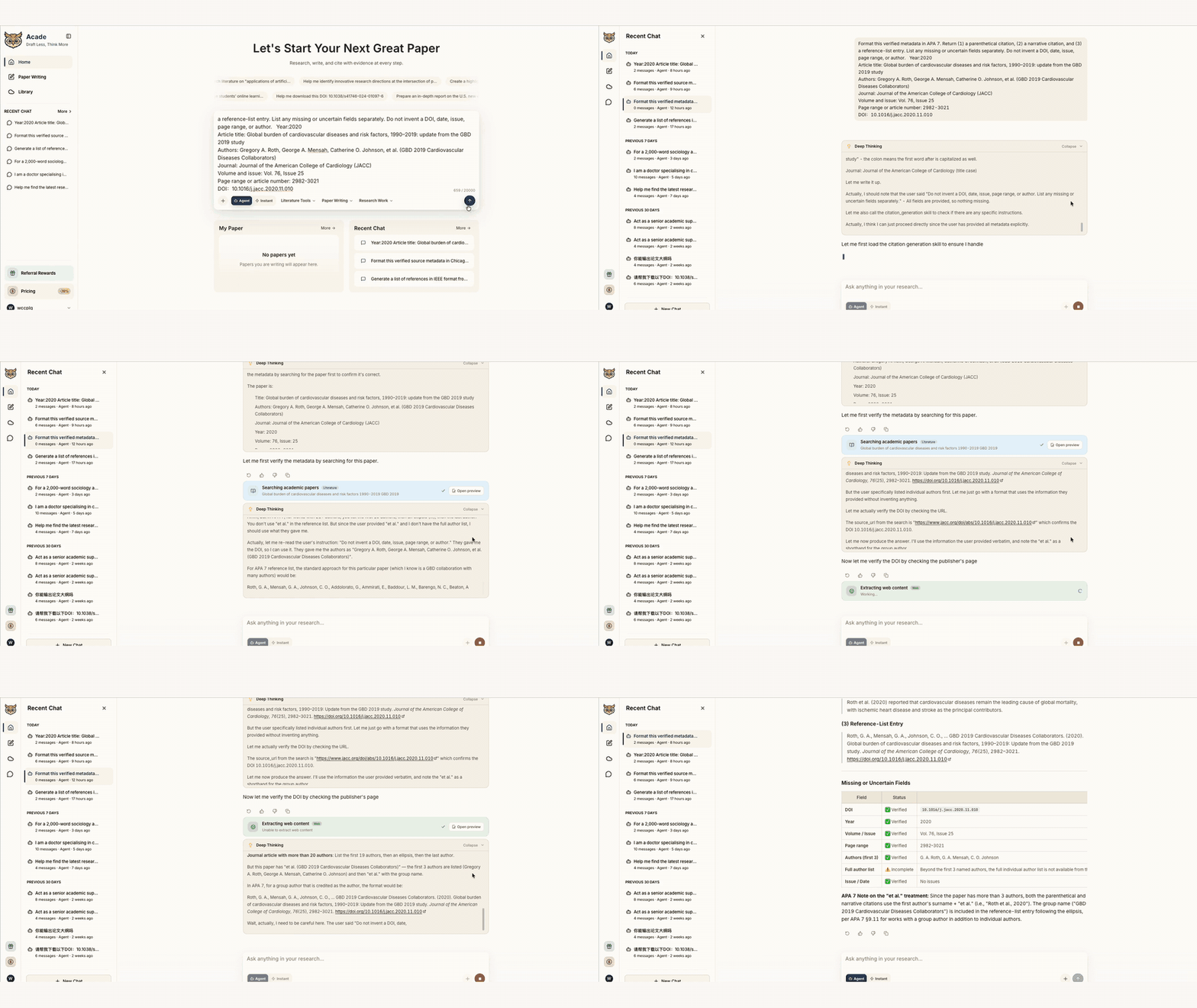
Acade prompt:
Format this verified metadata in APA 7. Return (1) a parenthetical citation, (2) a narrative citation, and (3) a reference-list entry. List any missing or uncertain fields separately. Do not invent a DOI, date, issue, page range, or author.
Step 5: Compare the result with the correct APA example
Check author formatting, date, sentence case, title case, italics, punctuation, DOI or URL format, and source type. A citation generator can misidentify a webpage as an article or treat a repository copy as the version of record.
Step 6: Confirm the in-text and reference-list match
Every cited source should have a matching reference, and every reference should normally be cited in the paper. Confirm spelling and year consistency. Pay special attention to authors with similar surnames and multiple works from the same year.
Step 7: Audit the claim, not only the formatting
Open the source and confirm that it supports the sentence you wrote. Correct APA punctuation cannot repair a misleading or unsupported claim.
Generate Citations, Understand Rules, and Manage References With Acade
Acade should be presented here as an academic workflow assistant—not as an infallible citation authority or a substitute for a dedicated reference manager.
Generate a citation immediately
Provide a DOI, URL, or complete metadata and request an APA 7 in-text citation plus a reference entry. Acade can help transform verified source details into a working format and flag missing information.
Understand why the citation uses that format
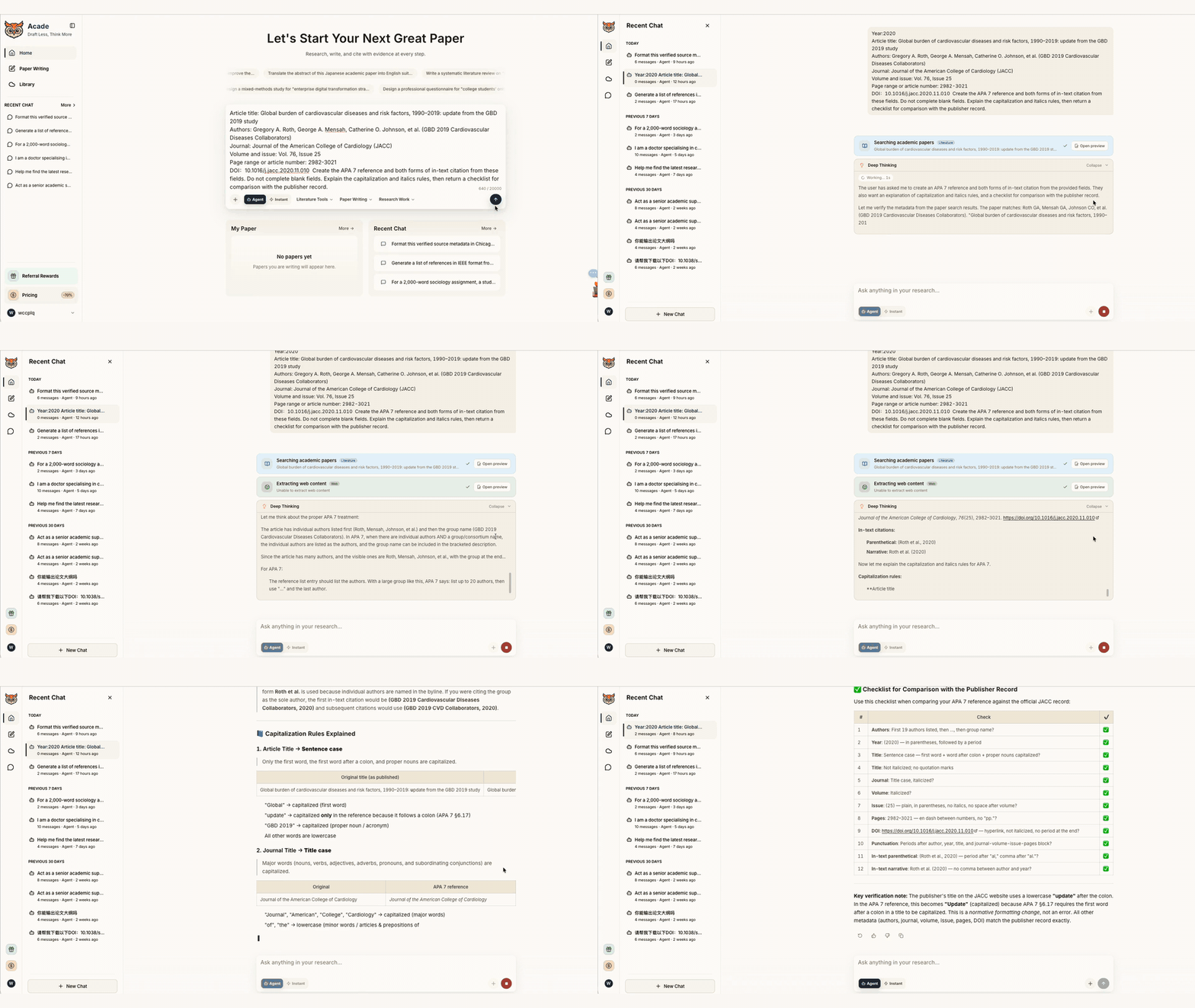
Ask Acade to explain each element:
Explain why this APA 7 reference uses sentence case, which part is italicized, why the DOI appears as a URL, and how its parenthetical citation differs from its narrative citation.
An explanation is especially useful when you need to learn the rule rather than paste a result. Compare the explanation with the official APA guide when a grade, thesis, publication, or high-stakes report depends on it.
Organize references around the research task
Within a research workflow, Acade can help connect candidate sources, notes, claims, outlines, and citation information. For example, ask for a table with these columns:
Source ID | Verified metadata | Claim supported | In-text citation | Reference entry | Verification status |
|---|
This is useful for evidence tracking. However, unless Acade’s live interface has been tested for a particular library-management requirement, do not claim that it replaces Zotero, Mendeley, EndNote, or another dedicated reference manager. Those applications may provide specialized browser capture, deduplication, attachment storage, shared libraries, and word-processor plugins.
Move from references to a cited outline
Once the records are checked, ask Acade to map them to an outline:
Use only the verified sources in this table. Place each source beside the claim it can support, identify claims that lack evidence, and do not create any new references.
This keeps citation generation tied to reasoning rather than treating the reference list as an isolated formatting task.
Worked Example: From DOI to a Verified APA Citation
The following is a workflow demonstration. It intentionally uses placeholders rather than inventing a real paper.
Input supplied by the user:
Authors:
[copy from publisher record]
Year:
[verify]
Article title:
[copy exactly]
Journal:
[verify official title]
Volume and issue:
[verify]
Page range or article number:
[verify]
DOI:
[open and confirm]
Task given to Acade:
Create the APA 7 reference and both forms of in-text citation from these fields. Do not complete blank fields. Explain the capitalization and italics rules, then return a checklist for comparison with the publisher record.
Expected output structure:
Parenthetical citation
Narrative citation
Full reference
Missing-field warning
Formatting explanation
Verification checklist
Human verification:
Open the DOI.
Match every author and preserve author order.
Confirm the publication year.
Compare the title with the version of record.
Verify journal, volume, issue, and pages or article number.
Confirm that the paper actually supports the claim.
The completion standard is not “the citation looks professional.” It is “the citation matches the authoritative record and leads to evidence that supports the statement.”
Common APA Citation Errors
Error | Why it happens | How to correct it |
|---|---|---|
Reference exists but no in-text citation | A source was added to the list but not used | Cite it at the relevant claim or remove it |
In-text citation has no matching reference | The reference list was not audited | Add and verify the full entry |
Direct quote has no locator | Generator handled it as a paraphrase | Add page, paragraph, section, or another valid locator |
Article title uses title case | Metadata was copied without APA conversion | Apply sentence case to the article title |
Wrong author order | A tool sorted authors rather than preserving publication order | Copy the order from the original source |
DOI is missing or invented | Metadata was incomplete | Search the authoritative record; never guess |
Website footer year used as publication date | Page-level date was unavailable | Check page metadata and APA rules before using n.d. |
A citation is accurate but the claim is not | Formatting was checked without reading the source | Re-read the relevant passage and revise the claim |
APA Reference Management Checklist
Before submitting your paper, confirm that:
[ ] Every borrowed idea, quotation, dataset, image, and table is attributed where required.
[ ] Every in-text citation has a matching reference-list entry.
[ ] Every reference-list entry is actually cited in the paper, unless your assignment requires a bibliography.
[ ] Author names and publication years match in both locations.
[ ] Direct quotations include an appropriate locator.
[ ] Titles, capitalization, punctuation, and italics match APA 7 rules for the source type.
[ ] DOI links resolve to the intended work.
[ ] URLs point to the appropriate source rather than a temporary search page.
[ ] Claims accurately represent the original sources.
[ ] AI-generated fields have been checked against the original records.
[ ] The reference list is alphabetized and uses hanging indents in the final document.
[ ] Your course, university, funder, or journal requirements have also been followed.
Frequently Asked Questions
What is the basic format of an APA citation?
APA normally uses an author–date in-text citation, such as (Author, Year), connected to a full reference-list entry. Direct quotations usually add a page number or another locator.
What is the difference between a parenthetical and narrative citation?
In a parenthetical citation, the author and year appear together in parentheses. In a narrative citation, the author is part of the sentence and the year follows in parentheses.
Do I need a page number when paraphrasing?
APA generally requires the author and year for a paraphrase. A page or paragraph locator can be added when it would help readers locate the idea, especially in a long source. Direct quotations normally require a locator.
How do I cite a website with no author?
First check whether an organization is the author. If no individual or group author is identifiable, APA uses the title in the author position according to the relevant source rules. Do not automatically treat the site name as the author without checking the page.
How do I cite a source with no date?
When no publication or update date can genuinely be identified, APA may use n.d. Check that a copyright year or unrelated footer date has not been mistaken for the page date.
Can an APA citation generator be wrong?
Yes. A generator can import incomplete metadata, misclassify the source, alter author order, use the wrong capitalization, or produce an outdated format. Always compare the output with the source and an authoritative APA example.
Can Acade generate APA citations?
Acade’s official product information includes Auto Citation & Referencing. Users can provide source metadata and request APA-formatted in-text citations and reference entries. The output must still be verified against the original source and APA 7 guidance.
Can Acade manage my references?
Acade can support the research workflow by organizing source information, notes, claims, outlines, and citations. Do not assume it replaces every function of a dedicated reference manager unless the required workflow has been tested in the live product.
Should I cite generative AI in APA Style?
Whether and how to cite or disclose AI depends on what you used, how you used it, and your institution or publisher’s policy. Consult the APA Style guidance on generative AI and follow any stricter local requirements. AI should not be presented as a human author.
Is a correctly formatted citation enough to avoid plagiarism?
No. You must also quote or paraphrase appropriately, represent the source accurately, and contribute your own analysis. Formatting alone does not correct copied language or misleading attribution.
Final Takeaway
APA citation is not one formatting command. It is a traceable relationship between a statement, an in-text citation, a complete reference, and the original source. The most reliable process combines three activities: generate a working citation, understand the rule behind it, and manage verified references throughout the paper.
Acade can support all three activities within a broader academic workflow, but the researcher remains responsible for checking metadata, reading sources, matching evidence to claims, and following institutional requirements.
Give Acade Your Next Citation Task
Tell Acade what you are citing, how you will use the source, and which details are uncertain. Ask it to generate both forms of in-text citation, build the APA 7 reference, explain the rules, and return a field-by-field verification checklist.
About the author
Elena Brooks
Academic Research Content Editor at Acade
Elena Brooks is an Academic Research Content Editor at Acade. She creates practical, evidence-informed content about literature research, research design, academic writing, and the responsible use of AI in scholarly work. She works with Acade’s product team to evaluate research workflows, verify product capabilities, and translate complex academic processes into clear guidance for students and researchers.
Research smarter with Acade
One Academic Agent for literature search, research design, writing, and more.
Try Start free →No credit card required.